Category: Software

  • [SOLVED] CCS: can’t find the library ‘lib/boot.aem4’

    [SOLVED] can’t find the library ‘lib/boot.aem4’ specified by package ti.targets.arm.rtsarm. It wasn’t found along the path

    You might get this error after changing the compiler version in the Project tab of the CCS General properties window.

    Issue is that the target field has changed, its very subtle bug in CCS as only the last letter might be missing:

    Solution

    Go to Project Properties > CCS General > Tab Products > Target.

    Manually set the Target field back to “ti.targets.arm.elf.M4F” or whatever it was before.

    Source:
    https://e2e.ti.com/support/tools/ccs/f/81/p/753415/2787904#2787904

  • [Solved] System_printf() on CC2640R2F

    Here is how to implement System_printf() to write to the console on T.I. CC2640R2F, this is the solution to the unsolved closed issue “CCS/CC2640R2F: Implementation of System_printf()” asked on TIs forum: https://e2e.ti.com/support/tools/ccs/f/81/t/670719.

    Chang the .cfg file to include SysMin, include the preprocessor XDC references, add the bufSize, remove all references to SysCallback:

    var SysMin = xdc.useModule('xdc.runtime.SysMin');
    SysMin.bufSize = 32;
    System.SupportProxy = SysMin;
    //var SysCallback = xdc.useModule('xdc.runtime.SysCallback');
    //System.SupportProxy = SysCallback;
    //SysCallback.abortFxn = "&myUserAbort";
    //SysCallback.exitFxn = "&myUserExit";
    //SysCallback.flushFxn = "&myUserFlush";
    //SysCallback.putchFxn = "&myUserPutch";
    //SysCallback.readyFxn = "&myUserReady";

    Where desired in your code, use System_printf(“Hello World”) and add the System_flush();

    System_printf("Hello World");
    System_flush();

    IMPORTANT STEP:

    After changing the .cfg, you absolutely need to rebuild the project, or CCS will not take the change in account!

    Menu Project > Clean…

    Rebuild, Load, Run.

    Open the Console view, select “Display Selected Console” and choose the “:CIO” view.

    You should now see “Hello World” printed via System_printf.

    Note: The flushing can be quite slow.

  • [SOLVED] SRFPROG.exe sometimes stuck or crashed

    You might have experienced this same issue, presented on e2e.ti.com forum, but TI has “locked” my thread without answer. Here’s how to solve that for a very fast and reliable flashing usable in production.

    We are trying to use srfprog.exe to flash the CC2640R2F, and it gets stuck very often, on any step or any argument, under Win-10 64, and using the JTAG from LaunchXL-CC2640R2. Note that SmartRF Flash Programmer 2 also gets stuck or crashes sometimes. I believe for the same reason.

    This, for example, is an output of srfprog where it got stuck and never returned:

    srfprog -ls auto
    
    Texas Instruments SmartRF Flash Programmer 2 v1.7.5-windows
    -------------------------------------------------------------------------------
    

    … stuck here.

    Here is the solution that has been proven to get srfprog.exe to work reliably without crashing for flashing TI’s CC2640 BLE chip family:

    • Wrap the srfprog calls into another program. Let’s call this wrapper srfwrap.
    • srfwrap will detect output activity from srfprog.exe .
    • If srfprog.exe is doing it’s job, it just goes on.
    • If srfprog.exe crashes or gets stuck, srfwrap will kill srfprog and restart the last command. Until it is successfully done.
    • Using this technique, I have been able to reliably program CC2640R2F in production.
    • Combined with other tools, programming the CC2640R2F can be as fast as under 40 seconds per chip, including the MAC address, a Serial Number, and securely locking the JTAG for unwanted access.

    I hope this helps, let me know in the comments 🙂

    Jerome

  • Hands on TI CC2640R2F

    Hands on TI CC2640R2F

    This is my first experience with CC2640R2F and also with TI more generally so I thought I’ll write down my feelings after a week as it might be of interest to someone else.

    Background

    I should mention that this was my very first time developing with TI, which means most of the comments concern TI more than the CC2640R2F specifically. I have been developing with other brands like Atmel, Microchip, Motorola and Cypress so there will be some kind of comparison with them.

    Goal and expectations

    I’ve been given a week to evaluate the CC2640R2F and try to estimate the required time for achieving the corresponding project. The accent is put on the capacity to connect up to 4 peripherals and one client. The connection needs to automatically be established and reconnected if disconnected.

    The chip

    The TI CC2640R2F is an improved version of the famous TI CC2640. The main difference is that the radio stack stays in an added ROM memory. This leaves more flash space for the user application. The chip is also ready for Bluetooth 5.0 once the Stack and SDK will be released. The main difference on this is a reduced link budget for an extended range, perfect for IoT.

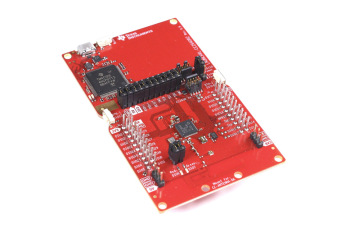
    LAUNCHXL CC2640R2 LaunchPad demo board

    I have been using the Launchpad which contains the Smart Bluetooth CC2640R2F controller, a Serial over USB chip also used for ISP and debugging, 2 leds and 2 user buttons.

    Installation

    Installation was long, on my computer it took a few hours for

    • BLE SDK and
    • code composer studio 7 (CCS 7).

    I made the mistake of choosing my own install directory, this is strongly unadvertised so after some errors I reinstalled everything again. this was on my “old” laptop so it might be quicker for you.

    CCS7

    Code Composer Studio 7 is based on eclipse that I already know from Android Apps development. However, the default view doesn’t show all the features I am used to have but that’s just a matter of configuration.

    Hello World

    As a hello world project I choose the “simple central” example project because it is close to my needs. Later I found the “multi role” project that’s even closer.

    Firstly impossible to compile : missing xxx files. Surely they are not in the directory, but how to get them in? I searched the forum but couldn’t find the answer so I asked for it. One user was quite quick for replying. It turns out you have to import the project API too, called “project name api”. Unfortunately CCS7 does not give you any hint why the files might be missing.

    Help

    I anticipated the problem that comes with every new IDE and system and ask for help. Tutor XYZ* who’s a professional that’s been working closely with and for TI briefly introduced me to the chip family and helped me to start. It is so much more convenient with someone’s help 🙂

    I asked my tutor and several other people, where is the documentation for the “simple central” or “multi role” examples. Surely there is. To that I got only very generic answers, “there isn’t any”, there’s a wiki and there’s a forum just ask everything there.

    The good news is that there is documentation, the bad news, it’s all over the places. So let’s list them:

    – SimpleLink academy. Learn about Smart Bluetooth applied to TI’s stack.

    – TI SDK user guide. I first discarded this document because I don’t understand what examples are doing in the SDK user guide. Still, this is where you will find the most complete and valuable information.

    – c:/ti/sdk_xxx/ directory. Mainly a doxygen help but does also provide information.

    – The forum e2e. This chip family has been around for years, so there should be a lot of common questions already answered. Unfortunately the search tool is not so good.

    – GitHub. Yes, there’s quite a lot of codes and guides that can’t be found anywhere else. I avoided GitHub at first because CCS7 has a cloud based Explorer so the content should be the same. The code is probably but the doc is definitely present in GitHub and missing in CCS7. FAIL. The search results is the best because it is looking into projects from similar controllers too. This brings us to the last point.
    https://github.com/ti-simplelink/ble-sdk-210-extra/tree/master/Projects/ble/multi_role

    – CC2640. Of course most of the examples and documentation for the CC2640R2F is the same as for the CC2640, make sure your searches include both.

    *XYZ. I prefer not to disclose the person’s name until I get approval to do so.

    EDIT 21.03.2017: It seems like TI read in my mind (or got my feedback via XYZ?), they now provide a description for each example directly in CCS’s cloud! It’s however not at the root but you should find it at two parent level from it.
  • PCB layout with Target3001! 

    PCB layout with Target3001! 

    After validating the feasibility of my IoT idea, I wanted to start drawing the schematic. There are plenty of PCB layout CAD software. Target3001 was in the list.

    Target3001! logo

    Why Target3001?

    I did not own a licence and prices are high, you better choose the right tool. Fortunately most of them have a free trial, perfect for evaluation before buying. This is how I ended up discarding my first choice: Element14 Circuit Studio made by Altium was a FAIL.

    My second choice went to Target3001 made by IBF in Germany. I used to work a lot with this software at the start of my career. It is not really popular but it is a serious electronic schematic and layout CAD tool. I don’t recall using Kikad or any other open source version because I consider them to be too basic or not professional enough.


    This was back in 2010 and Target3001 already featured the famous 3D view. I remember it to be average and buggy but wanted to see if IBF did any improvement.

    How did it go?

    While the design software is not so beautiful, it is mature and implements a lot of advanced functions. I did experience a few bugs but nothing to worry about.

    Eventually, I ended up drawing the whole electronic schematic and started the layout. The weakest point was applying changes, pushing a track doesn’t automatically push its neighbors as it does in some other CAD tools. In fact, it doesn’t even keep the angles or anything. So if you move things around for any reason the resulting work is very heavy.

    Creating a component is easy once you understand the philosophy, where the coordinates are etc. If you decide to give Target3001 a try you will need to create a component; the default library is lacking of SMT components, but there shouldn’t be any problem concerning through holes.


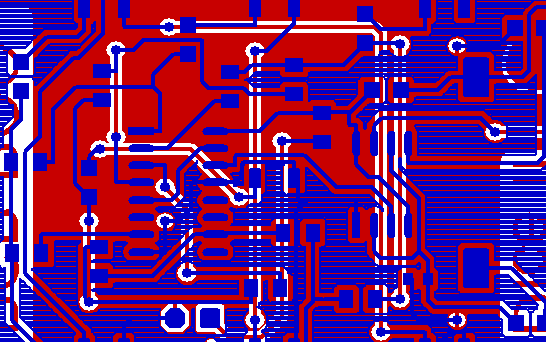
    I was rather unhappy with the default silk screen of the provided library of SMT components, it is way too large. The solution was quite simple. I draw my own silk screen layer, smaller and thinner. I produced the red PCB with PCBGOGO and the result looked nice on the board.


    IoT PCB designed in Target3001!
    My PCB designed in Target3001!

    Would I recommend Target3001?

    I am not sure how easy it is to learn using Target3001 from scratch because I new it already. That said, if you want a cheaper and good electronic design software to design your IoT device, I suggest giving it a try and let me know your thoughts.

  • PCB design with Altium Circuit Studio. FAIL.

    PCB design with Altium Circuit Studio. FAIL.

    Altium Circuit Studio sold by Element14 (Farnell) is a stripped down and cheaper version of the famous Altium Designer.

    I thought I’ll give it a try as they just reduced the price to about 1000$. This makes it competitive with others in the same feature and price range.

    I installed the 30 days trial and started to design the schematic of my IoT project. I have used Altium Designer and even Protel during my studies so not so difficult to remember basic usage.

    I quickly noticed a lot of bugs, crashes and very bad user experience (UX). It finally went to a point that the whole software became unusable due to constant crashes.

    I reported a rather long list of issues that was left without answer. Until another user raised the same major issue on the Element14’s forum: the minimal screen resolution shall be at least 1280 x 1024. Following my complain they finally got in touch but the conclusion is pretty deceiving for Digital Nomads using an ultra portable:

    For any customers using lower res laptops, they get around this limitation by using sw that allows scrolling of the screen. I know it is not the answer the customer is looking for but we do appreciate the candid feedback.

    Altium via Farnell, 2016-11-04

    Altium also assured that the crashes are not common but they don’t have a solution. Trying Circuit Studio was a FAIL for me. I wish it would work as it looks nice and I recommend you to try it. I’ll certainly give it another try with a new computer. But for now it led me to go back towards IBF Target3001 which I used to work with when I started my career.